Performance Max B2B — ใช้ได้จริงไหม และควรตั้งค่ายังไง ปี 2026
Performance Max B2B ใช้ได้จริงไหม? คู่มือครบ — เหตุที่ PMax ให้ lead ต่ำคุณภาพ, วิธีตั้งค่าที่ถูก, asset group strategy, และวัดผลอย่างไรในปี 2026

Performance Max B2B — ใช้ได้จริงไหม และควรตั้งค่ายังไง ปี 2026
ทีม B2B หลายเจ้าเปิด Performance Max แล้วพบปัญหาเดิม: impressions พุ่ง, cost ไหล, แต่ไม่รู้ว่า Google AI เอา budget ไปลงที่ไหน — Search? YouTube? Display? และที่น่าหนักใจกว่าคือ lead ที่ได้มา “เยอะแต่ขยะ” เพราะ algorithm ไม่รู้ว่า lead ที่ดีของธุรกิจคุณหน้าตาเป็นยังไง
ปัญหานี้ไม่ได้เกิดจาก PMax ไม่ดี แต่เกิดจากการตั้งค่าที่ขาด signal ที่ถูกต้อง บทความนี้จะอธิบายว่า Performance Max B2B ใช้ได้จริงไหม ควรตั้งค่ายังไง และวัดผลอย่างไรให้ AI เรียนรู้ได้ถูกทิศ
Key Takeaways:
– Performance Max B2B ใช้ได้ แต่ต้องป้อน signal ที่ถูกต้อง — Audience Signal + Conversion Goal คือหัวใจ
– อย่าใช้ Lead Form เดี่ยว — B2B ต้องการ qualified conversion เช่น “Request Demo” หรือ CRM-linked goal
– Audience Signal ที่ดีที่สุด คือ Customer Match List (CRM email) + website visitors ที่เคย convert
– ขั้นต่ำ 30-50 conversions/เดือน ก่อน PMax จะ optimize ได้ดี — B2B งบน้อยควรเริ่มด้วย Search ก่อน
– Mute channel ที่ไม่ต้องการ ไม่ได้ — ทางเดียวคือปรับ asset group และ signal ให้ AI เน้น intent-driven inventory
Performance Max B2B คืออะไร และครอบคลุม Channel ไหนบ้าง
Performance Max (PMax) คือ campaign type ของ Google Ads ที่รวม inventory ทั้งหมดของ Google ไว้ในที่เดียว — Search, Display, YouTube, Gmail, Discover และ Maps Google AI จัดการ bidding, targeting และ creative combination แบบ real-time โดยอิงจาก conversion goal ที่คุณกำหนด
เปิดตัวปี 2021 และกลายเป็น default campaign type แทน Smart Shopping กับ Local campaigns ในปี 2022 ปัจจุบัน PMax ยังอัปเดต Search terms transparency ให้ดีขึ้นเรื่อย ๆ แต่ B2B ยังต้องเข้าใจกลไก AI ก่อนจะ trust ระบบได้
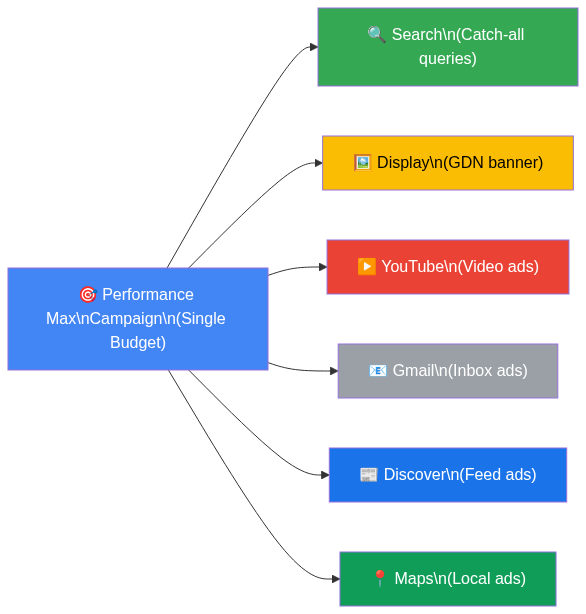
สำหรับ B2B ที่มี sales cycle ยาว channel ที่มักให้ผลดีที่สุดใน PMax คือ Search inventory (เพราะ high-intent) ตามด้วย YouTube remarketing สำหรับ consideration stage — ส่วน Display และ Discover มักได้ impression สูงแต่ conversion rate ต่ำกว่า
ถ้าอยากเข้าใจพื้นฐาน Google Ads สำหรับ B2B ก่อน ดูได้ที่ Google Ads คู่มือฉบับสมบูรณ์สำหรับ B2B ไทย
ทำไม B2B ถึงลังเลกับ Performance Max
B2B ไม่ใช่ E-commerce — conversion ไม่ใช่แค่ “add to cart” แต่คือ “นัด demo กับ decision maker” และ AI ของ PMax ถูกออกแบบมาเพื่อ maximize conversions โดยไม่ได้แยกแยะว่า lead นั้น qualified หรือเปล่า
ปัญหาที่ B2B พบบ่อย:
- Lead quantity สูง แต่ quality ต่ำ — PMax ดึง traffic จาก broad keyword และ Display network ที่ไม่ match ICP (Ideal Customer Profile)
- Black box problem — ไม่รู้ว่า budget ถูกใช้ที่ channel ไหน แม้ Insights report จะดีขึ้น แต่ยังไม่ละเอียดเท่า campaign แยก
- Brand keyword cannibalization — PMax จะชนะ campaign อื่นใน auction ส่งผลให้ brand search ถูก PMax ดึงไป และ inflate conversion numbers
- Conversion signal อ่อน — B2B มี conversion น้อยและ sales cycle ยาว ทำให้ Smart Bidding ขาดข้อมูลพอที่จะ optimize
- ขาด negative keyword control — PMax ไม่รองรับ keyword-level negative แบบ traditional campaign (มีแค่ account-level และ campaign-level exclusion)
แต่นั่นไม่ได้แปลว่า PMax ใช้ไม่ได้ — แปลว่าต้องตั้งค่าให้ถูกวิธีตามบริบท B2B
ตั้งค่า Performance Max สำหรับ B2B อย่างถูกต้อง
การตั้งค่า PMax B2B ที่ดีเริ่มจากการสร้าง signal ที่ถูกต้องให้ AI เรียนรู้ได้ ไม่ใช่แค่กดสร้าง campaign แล้วรอผล
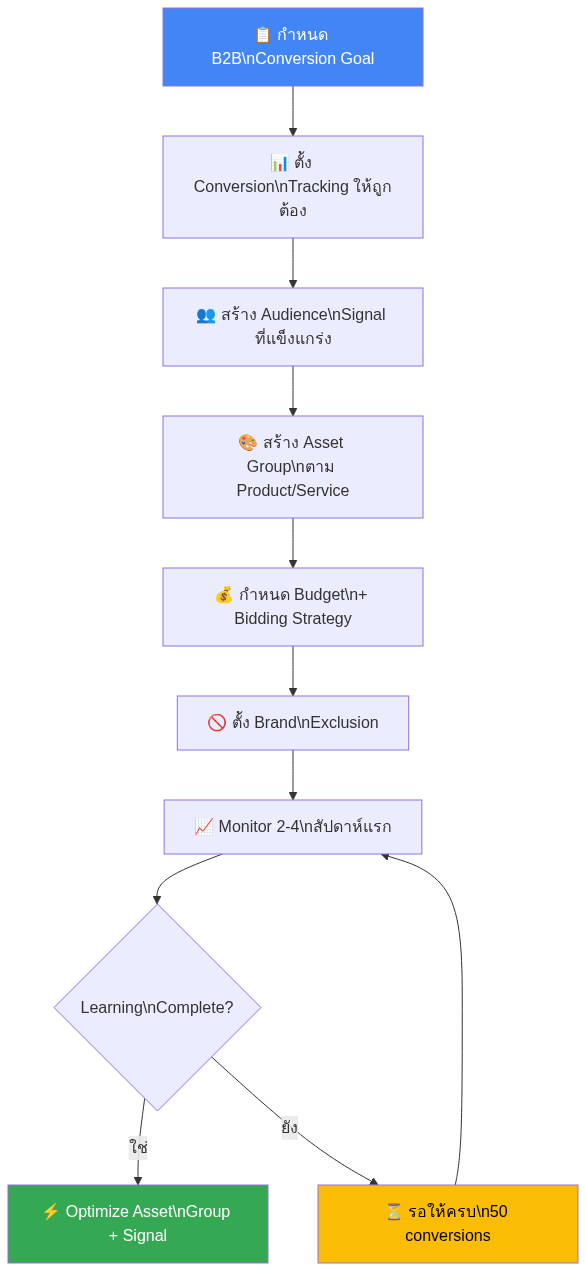
1. กำหนด Conversion Goal ให้ตรง B2B Intent
นี่คือขั้นตอนที่สำคัญที่สุด — ถ้า conversion goal ผิด AI จะ optimize ผิดทิศ
สิ่งที่ควรทำ:
– ใช้ “Request Demo” หรือ “Contact Sales” เป็น primary conversion แทน generic “form submission”
– เชื่อม CRM เพื่อ import offline conversion — เมื่อ lead กลายเป็น MQL หรือ SQL ให้ส่งสัญญาณกลับมาที่ Google Ads
– ตั้ง conversion value ถ้าทำได้ เช่น “Request Demo” = 1,000 บาท, “Closed Deal” = 50,000 บาท
สิ่งที่ควรหลีกเลี่ยง:
– อย่า optimize จาก page view หรือ “any form fill” เพราะรวม spam ไว้ด้วย
– อย่าใช้ micro-conversion เป็น primary goal เช่น “เลื่อน page” หรือ “ดู video 30 วินาที”
สำหรับการวาง conversion tracking ที่ถูกต้อง แนะนำอ่าน GA4 + GTM + Conversion API สำหรับ B2B ก่อน
2. สร้าง Audience Signal ที่แข็งแกร่ง
Audience Signal ไม่ใช่ targeting แบบ hard limit แต่เป็น “คำแนะนำ” ให้ AI เริ่มต้น explore จากกลุ่มที่มีแนวโน้ม convert สูง
Audience Signal ที่ดีที่สุดสำหรับ B2B:
| Priority | Signal Type | เหตุผล |
|---|---|---|
| สูงสุด | Customer Match (CRM emails) | คนที่เคย engage หรือเป็นลูกค้าอยู่แล้ว |
| สูง | Website Visitors ที่ convert | High-intent past behavior |
| กลาง | Custom Intent (B2B keywords) | คนที่เคยค้นหา keyword ที่เกี่ยวข้อง |
| ต่ำกว่า | In-market Audiences | Google estimate — กว้างกว่า first-party data |
3. ตั้ง Brand Exclusion และ Negative Keywords
- ไปที่ Campaign settings → Brand exclusions → เพิ่ม brand ของคุณเพื่อป้องกัน PMax ชนะ branded search campaign
- ใช้ account-level negative keyword list สำหรับ irrelevant terms เช่น “free”, “jobs”, “career”, “tutorial” ที่ไม่ใช่ commercial intent
Asset Group Strategy สำหรับ B2B
Asset Group คือหน่วยย่อยของ PMax ที่คุณควบคุมได้มากที่สุด — แต่ละ group มี headlines, descriptions, images, videos และ audience signal ของตัวเอง
หลักการแบ่ง Asset Group สำหรับ B2B:
แบ่งตาม Product/Service Line
ถ้าคุณขายหลาย service ควรสร้าง Asset Group แยกกัน เช่น:
– Group 1: “Google Ads Management” — landing page: /google-ads-service/
– Group 2: “Meta Ads Management” — landing page: /meta-ads-service/
– Group 3: “MarTech Consulting” — landing page: /martech-service/
อย่า mix service ใน group เดียว เพราะ message จะ dilute และ Google ไม่รู้ว่า creative ไหนเหมาะกับ user ไหน
แบ่งตาม Funnel Stage (Advanced)
- Top Funnel Group: Audience = Custom Intent (broad keywords) + YouTube lookalike — ใช้ educational messaging
- Bottom Funnel Group: Audience = Website visitors + CRM list — ใช้ CTA ตรง ๆ เช่น “นัด Demo ฟรี”
Headline Best Practices สำหรับ B2B
- ใส่ focus keyword ใน Headline 1 เสมอ
- หลีกเลี่ยง clickbait — B2B buyer ตอบสนองต่อ specificity: “เพิ่ม qualified lead ได้ชัดเจนใน 90 วัน” ดีกว่า “เพิ่ม lead มหาศาล”
- ใส่ social proof: “ลูกค้า 50+ บริษัทในไทย”, “ทีม Certified Google Partner”
ดูหลักการ Search Ads เพิ่มเติมได้ที่ Search Ads vs Display Ads — เลือกอะไรดี
วัดผลและ Optimize PMax B2B
Metrics ที่ควร Track
PMax reporting ใน Google Ads ยังจำกัด แต่มี metrics ที่สำคัญที่ดูได้:
| Metric | เป้าหมาย B2B | หมายเหตุ |
|---|---|---|
| Conversion Rate | ≥ 3-5% (สำหรับ demo request) | ขึ้นอยู่กับ landing page quality |
| Cost per Conversion | ต่ำกว่า target CPA | ตั้ง target CPA ตาม LTV ของ customer |
| Impression Share | ติดตาม trend | ถ้าลดลงอาจต้องเพิ่ม budget |
| Search Impression Share | ≥ 60% | สำหรับ branded + core keywords |
Asset Performance Report
ไปที่ Campaign → Asset Details เพื่อดูว่า asset ไหน “Low”, “Good”, หรือ “Best”
- Low performance asset: แก้หรือเปลี่ยนใหม่ทันที
- Best performance asset: ดู pattern แล้วสร้าง asset ใหม่ที่คล้ายกัน
Insights Tab ที่ควรดู
- Search Categories: ดูว่า PMax ไปแสดงใน query category ไหนบ้าง
- Audience Insights: กลุ่มไหน convert มากที่สุด → ใช้เป็น signal ใน round ต่อไป
สำหรับ Attribution Model ที่ถูกต้องสำหรับ B2B sales cycle ยาว ดูที่ Attribution Model B2B Guide 2026 และ MarTech Analytics & Tracking Guide
ข้อผิดพลาดที่พบบ่อยใน Performance Max B2B (5 ข้อ)
1. ใช้ “Any Form Submission” เป็น Primary Conversion
นี่คือข้อผิดพลาดที่พบบ่อยที่สุด — ระบบ optimize เพื่อให้ได้ form fill สูงสุด แต่ไม่แยกแยะว่าเป็น job seeker, student หรือ competitor ที่เข้ามา solution คือ import offline conversion จาก CRM และใช้เฉพาะ qualified lead
2. ไม่ Exclude Brand Keywords
PMax ชนะ branded search campaign ใน auction เสมอ ผลคือ brand conversion ถูกนับเป็น PMax conversion ทำให้ metric ดูดีเทียม ตั้ง brand exclusion list ตั้งแต่วันแรก
3. Budget น้อยเกินไปสำหรับ Learning Phase
Google แนะนำ 50 conversions/เดือน แต่ B2B ส่วนใหญ่ทำได้แค่ 10-15 — ผลคือ campaign ติด “Limited by learning” นาน และ result ไม่ stable ถ้า budget จำกัด ควรเริ่ม Search campaign ก่อนสะสม conversion data แล้วค่อยเปิด PMax
4. สร้าง Asset Group เดียวสำหรับทุก Service
เมื่อ message ไม่ match กับ service ที่ user สนใจ Conversion Rate จะต่ำ แบ่ง Asset Group ตาม product line และใส่ Final URL ที่ตรงกับ service นั้นทุกครั้ง
5. ไม่ Monitor Auction Insights
PMax ไม่มี Search Term report แบบละเอียดแต่มี Auction Insights — ถ้าเห็น competitor ใหม่เข้ามาแสดงว่า AI ขยาย reach ออกไปในทิศที่คุณอาจไม่ต้องการ ให้ review Placement Exclusion และ Brand Exclusion
FAQ Performance Max B2B
Q: Performance Max B2B เหมาะกับธุรกิจแบบไหน?
เหมาะที่สุดสำหรับ B2B ที่มี conversion volume พอ (30+ ต่อเดือน), sales cycle ไม่ยาวเกิน 60 วัน และมี landing page ที่ convert ดีอยู่แล้ว ธุรกิจ niche มาก (เช่น industrial equipment ที่ลูกค้าในไทยมีแค่ 200 บริษัท) ควรระวัง เพราะ AI ไม่มี signal พอ
Q: PMax กับ Search Campaign B2B ใช้ร่วมกันได้ไหม?
ได้ และแนะนำให้ใช้ร่วมกัน กลยุทธ์ที่ดีคือใช้ Search campaign สำหรับ high-intent specific keywords (เช่น “[service] ราคา”, “[service] Thailand”) และใช้ PMax สำหรับ catch-all + remarketing ทั้งสอง campaign จะ share auction แต่ Search campaign จะชนะ query ที่ตรงกับ keyword ที่ตั้งไว้
Q: ต้องมี video สำหรับ PMax ไหม?
ไม่บังคับ แต่ถ้าไม่มี Google จะ auto-generate video จาก image และ text ของคุณ ซึ่งมักให้ผลที่ไม่ดีนัก แนะนำอย่างน้อยมี video 15-30 วินาทีที่อธิบาย value proposition ชัดเจน
Q: PMax report ไม่โปร่งใส — มีวิธีดู breakdown channel ไหม?
ไปที่ Campaigns → Performance Max → Insights tab → Asset audience insights และ Search categories จะให้ภาพกว้างว่า budget กระจายไปทิศไหน แต่ breakdown แบบ channel-level ยังไม่มีใน UI ปัจจุบัน Google ระบุว่ากำลังปรับปรุง transparency อย่างต่อเนื่อง
Q: ถ้า PMax ให้ lead ไม่ดี ควรปิดหรือแก้ไข?
ก่อนปิดควรลอง: (1) เปลี่ยน conversion goal ให้ qualified กว่าเดิม (2) เพิ่ม Customer Match list (3) เพิ่ม negative keywords ที่ account level และ (4) แก้ Asset Group ให้ specific มากขึ้น ถ้าทำทุกอย่างแล้วยังไม่ดีใน 60 วัน ค่อยพิจารณาปิดและกลับไปใช้ Search + Display แยกกัน
สรุป
Performance Max B2B ไม่ใช่ “ปุ่มเดียวแล้วรอเงิน” — มันคือ campaign type ที่ทรงพลังมากเมื่อใช้ถูก แต่ก็ทำลาย budget ได้เร็วมากเมื่อใช้ผิด
กุญแจสำคัญคือ:
1. Conversion Goal ที่ qualified — อย่าใช้ vanity conversion
2. Audience Signal จาก first-party data — CRM list และ past converters
3. Asset Group แยกตาม service — ไม่ใช่ one-size-fits-all
4. Brand Exclusion ตั้งแต่วันแรก — ป้องกัน data inflate
5. ความอดทนในช่วง learning — ให้ 4-6 สัปดาห์ก่อนตัดสินผล
ถ้าคุณยังใหม่กับ Google Ads B2B โดยรวม แนะนำอ่าน Google Ads Guide Thailand ก่อน แล้วค่อยกลับมาตั้งค่า PMax เมื่อมี conversion data พอ