MarTech Analytics & Tracking Guide สำหรับ B2B ปี 2026 — GA4, GTM, Server-side, CAPI
คู่มือ MarTech Analytics & Tracking ครบสำหรับ B2B ปี 2026 — ครอบคลุม GA4, GTM client + server, Conversion API, Event Schema, Looker Studio, Closed-loop tracking, และ Privacy/PDPA
MarTech Analytics Tracking Guide สำหรับ B2B ปี 2026 — GA4, GTM, Server-side, CAPI
Martech Analytics Tracking B2B ไทย คือหัวข้อที่บทความนี้จะอธิบายอย่างละเอียด — Key Takeaways: Tracking คือ foundation ของ MarTech ทั้งหมด — ถ้า tracking พัง strategy, attribution, AI bidding ทำต่อไม่ได้ ปี 2026 stack ที่ B2B ต้องมี = GA4 + GTM (client) + GTM Server + Conversion API ครอบคลุมทุก platform + Closed-loop tracking ที่เชื่อม CRM กลับมาที่ Google Ads/Meta คู่มือนี้รวมทุกอย่าง — เริ่มต้น GA4 setup, GTM organization, Server-side tracking ทำไมต้องใช้, Conversion API setup, event schema design, Looker Studio dashboards, Privacy + PDPA compliance, และ trends ปี 2026
ทำไม Pillar นี้สำคัญที่สุดใน MarTech Stack
Tracking คือสิ่งที่ทำให้ MarTech ใช้งานได้จริง — ทุกการตัดสินใจของ Marketer ขึ้นอยู่กับ data:
– Smart Bidding (Google/Meta) optimize ตาม conversion data
– Attribution model วิเคราะห์จาก touchpoint data
– CRM lead scoring คำนวณจาก behavior data
– ROI report บอกได้ก็เพราะมี tracking
ถ้า tracking ผิด/ขาด = ตัดสินใจ blind
ปี 2026 มี 3 ความท้าทายที่ B2B ไทยต้องเตรียมตัว:
1. Cookie-less era — Apple ATT, Safari ITP, Firefox ETP block third-party cookie
2. iOS continued privacy push — ATT opt-out rate ในไทยอยู่ในระดับสูง
3. PDPA compliance — Cookie consent + data subject rights
บทความนี้คือ single source of truth สำหรับ MarTech Tracking B2B ไทยปี 2026
Tracking Stack ที่ B2B ต้องมีปี 2026
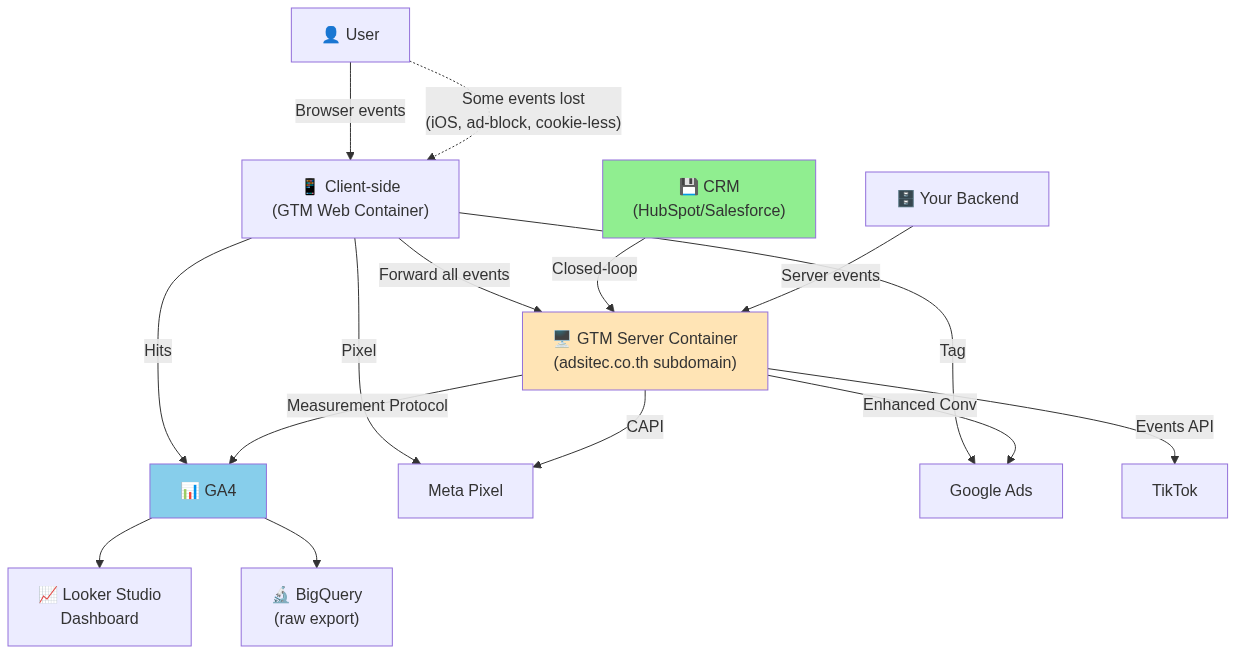
แผนภาพข้างบนคือ target architecture ของ B2B medium ปี 2026 — แต่ไม่ต้องสร้างทุกอย่างพร้อมกัน อ่านต่อด้านล่างเพื่อ implementation plan แบบ phase
GA4 — Foundation ของทุก analytics
UA (Universal Analytics) → GA4 Transition Impact
Google sunset UA ในเดือน กรกฎาคม 2023 — GA4 เป็น analytics หลักของ Google ตั้งแต่นั้นมา
สิ่งที่เปลี่ยน:
– Event-based model — ไม่ใช่ session-based อีกต่อไป
– Cross-device tracking — ดีกว่า UA มาก
– AI-powered insights — predictive metrics, anomaly detection
– BigQuery free export — สำหรับ raw data analysis (เดิม UA ต้องจ่าย 150k/ปี ใน GA360)
Event-based Model — สำคัญที่สุดต้องเข้าใจ
ใน GA4 ทุกอย่างคือ event — page view ก็เป็น event, click ก็เป็น event, conversion ก็เป็น event
แต่ละ event มี:
– Event name — เช่น page_view, lead_submit, demo_request
– Event parameters — context ของ event (page URL, value, etc.)
– User properties — ข้อมูล user (logged-in status, plan tier, industry)
GA4 Default Events (มาฟรี ไม่ต้อง setup)
| Event | Trigger | B2B Value |
|---|---|---|
page_view |
Page load | Baseline traffic |
scroll |
90% scroll | Content engagement |
click (outbound) |
External link click | Referral out |
file_download |
PDF/doc download | High-intent action (B2B!) |
video_start/progress/complete |
YouTube embed | Video engagement |
form_start/submit |
Form interaction | Lead capture |
GA4 Conversions Setup สำหรับ B2B
Conversion event = สำคัญที่สุดสำหรับ B2B — ใช้ทั้ง report + send กลับไป Google Ads สำหรับ Smart Bidding
Setup process:
1. Admin → Events → New event (custom)
2. ตั้งเงื่อนไข: เช่น page_path contains /thank-you
3. Mark as conversion
4. Link ไป Google Ads (Admin → Product links → Google Ads link)
B2B Conversion events ขั้นต่ำ:
| Event | Trigger | Funnel Stage |
|---|---|---|
newsletter_signup |
Newsletter form submit | TOFU |
content_download |
Gated content download | MOFU |
demo_request |
Demo form submit | BOFU |
pricing_view |
Visit /pricing | BOFU |
consultation_book |
Calendly booking | BOFU |
BigQuery Export — ของจริงสำหรับ B2B
GA4 → BigQuery export ฟรี (เดิม UA ต้อง $150k/ปี)
ทำไมสำคัญ:
– Raw event data + user data
– Join กับ CRM data ได้ที่ BigQuery
– คำนวณ custom metric ที่ GA4 UI ทำไม่ได้
– LTV, cohort analysis, churn prediction
Setup: Admin → BigQuery Links → Link → choose project → Done (5 นาที)
GA4 Mistakes ที่พบบ่อยใน B2B
❌ ใช้ default conversion event อย่างเดียว — ไม่ custom สำหรับ B2B funnel
❌ ไม่ link Google Ads — Smart Bidding ไม่ได้ใช้ GA4 conversion
❌ ไม่ exclude internal traffic — data จากทีมเองรบกวน analysis
❌ ไม่ set up cross-domain tracking — เสีย attribution ตอน user ข้าม subdomain
❌ ไม่ enable BigQuery export — เสีย raw data ตลอดไป
อ่านลึก → GA4 Setup ที่ถูกต้องสำหรับ B2B (รอเขียน)
Google Tag Manager (GTM) — Container ของทุก tag
ทำไมต้อง GTM แทน Hard-code
Hard-code ปัญหา:
– ทุก tag ต้องผ่าน dev → slow turnaround (week+)
– Dev ไม่ใช่ marketer — ความเข้าใจ business logic อาจไม่ตรง
– การ debug ยาก
– เปลี่ยน vendor lำบาก
GTM แก้:
– Marketer add/edit tag เอง (no-code)
– Version control + workspace (เหมือน Git)
– Built-in debug mode
– Templates สำเร็จรูปสำหรับทุก major platform
3 Concepts หลักของ GTM
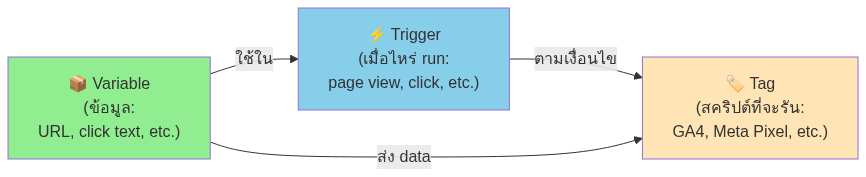
Workspace + Version Control
GTM แต่ละ container มี:
– Workspaces = branches (เหมือน Git) — แยกการแก้ไขระหว่าง user/feature
– Versions = snapshots ที่ publish แล้ว
– Environments = staging/production (Production-grade GTM ใช้)
Best practice:
– 1 workspace per feature/release
– Test ใน Preview mode ก่อน publish
– Document ในชื่อ workspace ว่าทำอะไร
– Version note ทุกครั้งที่ publish
GTM Tag Organization สำหรับ B2B
Naming convention:
[Platform] - [Event/Purpose] - [Page/Trigger context]

GA4 - Page View - All Pages
GA4 - Conversion - Demo Request
Meta - Pixel Base - All Pages
Meta - Lead Event - Form Submit
LinkedIn - Insight Tag - All Pages
Google Ads - Remarketing - All Pages
Folder structure:
– GA4 Tags
– Conversion Tags (Meta, Google, LinkedIn, TikTok)
– Remarketing Tags
– Custom Events
– Debug Tags
Built-in Templates ที่ใช้ใน B2B
GTM มี community template gallery:
– HubSpot tracking
– Salesforce Pardot
– LinkedIn Insight Tag
– Hotjar / Microsoft Clarity (heatmap)
– Cookie consent (CookieYes, Cookiebot)
Server-side Tracking — ทำไมต้องใช้ปี 2026
Client-side Limitations ปี 2026
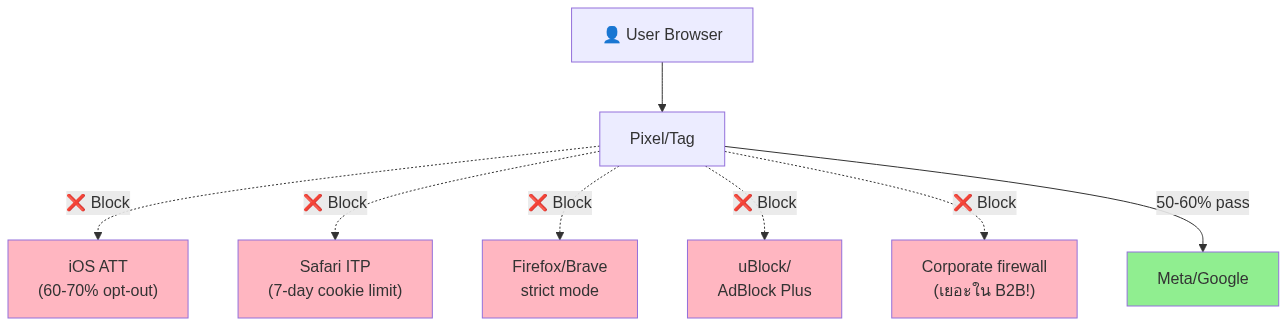
ผลลัพธ์: 40-50% ของ conversion data หาย = Smart Bidding optimize ผิด
Server-side Benefits
| Aspect | Client-side | Server-side |
|---|---|---|
| Cookie/ATT impact | ❌ Affected | ✅ Bypass |
| Ad-blocker impact | ❌ Block ได้ | ✅ Bypass |
| Page speed | ❌ Slow (load tag เยอะ) | ✅ Fast |
| Data control | ❌ ส่งตรงไป vendor | ✅ Filter ก่อนส่ง |
| First-party context | ❌ จำกัด | ✅ Full access |
| Setup complexity | Easy | Medium |
| Cost | $0 | $10-50/month cloud |
GTM Server Container — Setup Overview
GTM Server Container = Google’s first-party server-side tagging solution
Architecture:
1. Client-side GTM ส่ง event → first-party subdomain ของคุณ (เช่น metrics.adsitec.co.th)
2. Server Container รับ + ประมวลผล + ส่งต่อไป vendor (Meta, Google, etc.)
3. Cloud hosting — Google Cloud Run (default) หรือ AWS / Azure
Cost estimate:
– Google Cloud Run: $20-50/month สำหรับ B2B medium (volume <1M events)
– Free tier ใช้ได้สำหรับ traffic ต่ำ
– DNS record + SSL cert (ฟรี)
When to invest in Server-side
✅ ทำเลย ถ้า:
– Ad spend > 100,000 บาท/เดือน (ROI ของ recovered conversion = หลายเท่าของ cloud cost)
– Conversion event critical (lead, demo, purchase)
– Audience B2B niche (data loss กระทบหนัก)
⚠️ รอก่อน ถ้า:
– Ad spend < 50,000 บาท/เดือน
– Conversion volume ต่ำ (<30/เดือน) — data ยังน้อยอยู่แล้ว
– ไม่มี dev resource เลย — ต้องการ pure no-code
ROI Calculation (ตัวอย่างจริง)
B2B SaaS ad spend 300,000/เดือน, CPL 1,500 บาท
– Lost conversions จาก client-side limitation: ~40% = 80 leads/เดือน
– Server-side recover: 25-30% = ~24 leads recovered
– Revenue per lead (avg deal × close rate × LTV): ~50,000 บาท
– Recovered revenue: 1,200,000 บาท/เดือน
– Server-side cost: ~$50 + setup time
– ROI: 700x+
Conversion API (CAPI) — Pixel ของ Post-cookie Era
CAPI คืออะไร — แตกต่างจาก Pixel ยังไง
| Pixel (client-side) | CAPI (server-side) | |
|---|---|---|
| Source | Browser | Your server |
| Blocked by ATT/ad-block? | ✅ Yes | ❌ No |
| Event matching rate | ~50-60% | ~85-95% |
| Latency | Real-time | Real-time (with retry) |
| Setup | Pixel tag | API integration |
| Recommended | ทั้งคู่ together | ทั้งคู่ together |
Meta CAPI — Setup Paths
Path A: Partner Integration (No-code)
– Shopify, WordPress (WooCommerce, etc.), HubSpot — มี native
– Setup time: 30-60 นาที
– Free
Path B: GTM Server Container
– ใช้ Server Container ส่งต่อ event ไป Meta
– ค่อนข้าง standard ปี 2026
– Setup time: 1-2 วัน
Path C: Custom API (Developer-heavy)
– Direct API call จาก backend
– Best control แต่ dev-cost สูง
Google Enhanced Conversions — Concept คล้ายกัน
Google Enhanced Conversions = ส่ง hashed first-party data (email, phone) → Google ใช้ match user ที่ tracking client-side ไม่ได้
Setup: ผ่าน GTM (no-code) หรือ Google Tag — 30 นาที
ผล: Conversion matching rate +5-10%, Smart Bidding optimize ดีขึ้น
TikTok Events API + Other Platforms
ทุก major platform มี server-side equivalent ปี 2026:
– TikTok — Events API
– LinkedIn — Conversions API (ใหม่ ปี 2023)
– Snapchat — Conversions API
– Pinterest — Conversions API
Pattern เดียวกัน: Server-side complement client-side, ส่ง hashed user data, deduplicate
Deduplication Strategy
Problem: ส่ง event ทั้ง Pixel + CAPI = double-count
Solution:
– ทุก event มี unique event_id (UUID)
– Pixel ส่ง event_id เดียวกับ CAPI
– Meta auto-deduplicate
Event Quality Measurement
Meta + Google มี Event Quality Score (EQS) — วัดว่า event data ของคุณดีแค่ไหน:
– Event Match Quality (EMQ) — Meta
– Data Quality Score — Google
Target ปี 2026: EMQ > 7/10, Data Quality > “Good”
วิธีเพิ่ม EMQ:
– ส่ง user_data ครบ (email + phone + name)
– Hash ก่อนส่ง (SHA-256)
– ส่งทั้ง Pixel + CAPI ด้วย event_id เดียวกัน
– ใช้ Server-side timestamps แม่นยำ
Event Schema Design — วาง Event ยังไงให้ Scale ได้
Naming Convention — สำคัญที่สุด
Pattern: verb_object หรือ action_context
| ❌ Bad | ✅ Good |
|---|---|
click1 |
cta_click |
submit |
lead_submit |
page2 |
pricing_view |
demo |
demo_request |
Rules:
– ใช้ snake_case (lowercase + underscore)
– ไม่ใช้ camelCase หรือ kebab-case (GA4 prefers snake)
– ไม่ใช้ space, dot, special characters
– ความยาว < 40 chars
– Past tense หรือ present? — present tense (lead_submit ไม่ใช่ lead_submitted)
Event Parameters Best Practice
ทุก B2B event ต้องมี parameters:
{
  "event_name": "demo_request",
  "params": {
    "form_id": "demo-bofu-v2",
    "page_path": "/pricing",
    "page_referrer": "/blog/martech-analytics-guide",
    "value": 50000,
    "currency": "THB",
    "lead_industry": "saas",
    "lead_company_size": "51-200",
    "lead_score": 75
  }
}
Recommended parameters per event type:
| Event | Required Params |
|---|---|
page_view |
page_path, page_referrer, page_title |
cta_click |
cta_text, cta_location, cta_destination |
form_submit |
form_id, form_step |
lead_submit |
form_id, lead_quality_score, value (estimated) |
content_download |
content_type, content_topic, content_id |
video_engagement |
video_id, video_progress, video_topic |
User Properties vs Event Properties
Event Property = ข้อมูลเฉพาะ event นั้น (page URL, value)
User Property = ข้อมูลของ user (industry, plan, account type)
B2B user properties สำคัญ:
– user_industry — saas, manufacturing, retail
– user_company_size — 1-10, 11-50, 51-200, 200+
– user_role — CEO, marketing-manager, IT-director
– user_account_tier — free, paid, enterprise
– user_signup_date — เก่า/ใหม่
– user_lifecycle_stage — lead, MQL, SQL, customer
Funnel Events สำหรับ B2B
ขั้นต่ำที่ต้อง track ตลอด funnel:
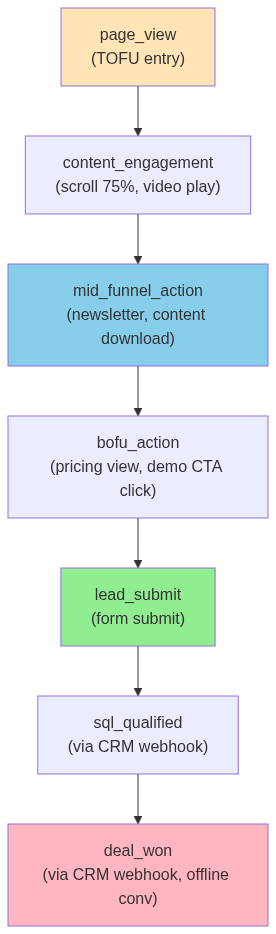
Custom Dimensions in GA4
หลังนิยาม event + parameters → ทำเป็น Custom Dimensions ใน GA4:
– Admin → Custom Definitions → Custom Dimensions
– Map parameter name → dimension name
– ใช้ใน report + Looker Studio
Limit: 50 event-scope + 25 user-scope custom dimensions (free tier)
Future-proofing
✅ ใส่ versioning ใน schema doc (เก็บ JSON schema ใน repo)
✅ Naming convention เขียนเป็น doc
✅ Schema validation ก่อน publish (ตรวจ event ใหม่ก่อน push)
✅ Quarterly schema review
อ่านลึก → Event Schema Design — วาง analytics event ยังไงให้ scale ได้ (รอเขียน)
Looker Studio Dashboard สำหรับ B2B
Why Looker Studio (เดิม Data Studio)
- ฟรี 100% — Google product
- Native connectors กับ GA4, Google Ads, BigQuery, Sheets
- Embed ได้ที่ไหนก็ได้
- Sharing เหมือน Google Doc
Connect GA4 → Looker Studio (5 นาที)
- Looker Studio → Create → Data Source
- Pick “Google Analytics” connector
- Authorize + เลือก GA4 property
- Click “Add” → start building
B2B Dashboard Templates ที่ควรมี
1. Executive Summary Dashboard (รายเดือน)
– Total leads, MQL, SQL, won deals
– Pipeline value
– ROAS by channel
– Top performing campaigns
2. Channel Performance Dashboard
– Traffic by source/medium
– Conversion rate by channel
– Cost per lead by channel
– Funnel stage drop-off
3. Content Performance Dashboard
– Top pages by traffic
– Top pages by conversion
– Avg engagement time
– Scroll depth + heatmap (via Hotjar/Clarity)
4. Lead Quality Dashboard
– Lead score distribution
– Industry × Company size breakdown
– Time to MQL
– MQL to SQL conversion rate
5. Real-time Operations
– Today’s traffic
– Active users now
– Latest conversions
– Top live pages
Real-time vs Blended Data
GA4 มี 2 mode:
– Realtime API — current data (last 30 min)
– Reporting API — processed data (delay 24-48 hours)
สำหรับ executive dashboard → ใช้ Reporting API (accuracy)
สำหรับ ops dashboard → ใช้ Realtime API
Sharing + Permissions
3 levels:
– View — readonly access
– Edit — modify dashboard
– Owner — manage sharing
B2B Best practice:
– Dashboard executive level → share to CEO/CMO (view only)
– Dashboard ops → share to marketing team (edit)
– Internal use only — ไม่ public link
Closed-loop Tracking สำหรับ B2B
Why “Closed-loop” สำคัญสำหรับ B2B
B2B funnel ยาว: ad click → form → MQL → SQL → demo → proposal → closed deal (3-12 เดือน)
Open-loop tracking = หยุดที่ form submit
Closed-loop tracking = track ตลอด funnel จนถึง deal won
ผลลัพธ์: Smart Bidding (Google/Meta) optimize ตาม revenue ที่ปิดจริง ไม่ใช่ “lead ทั่วไป”
Architecture แบบ Closed-loop
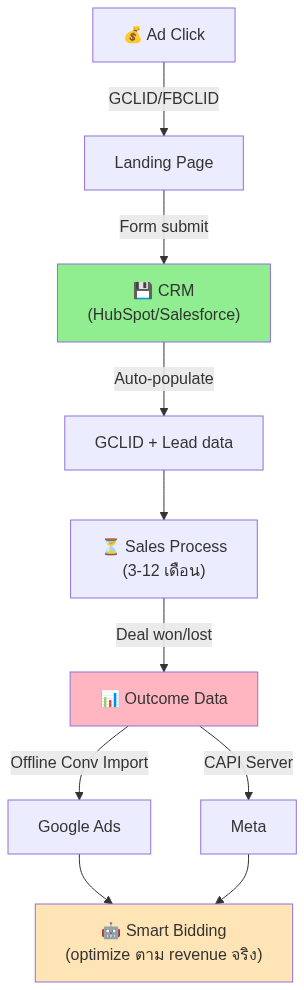
CRM Integration — HubSpot vs Salesforce
HubSpot:
– Native GA4 integration ผ่าน “HubSpot tracking code”
– Native Google Ads + Meta Ads integration (Offline Conversion Sync)
– Setup time: 30-60 นาที
– ✅ เหมาะ B2B medium
Salesforce:
– ผ่าน Pardot หรือ Salesforce Marketing Cloud
– Connector กับ Google Ads + Meta Ads
– Setup time: 1-2 วัน (ต้องการ dev/admin)
– ✅ เหมาะ B2B large/enterprise
Self-built CRM:
– ต้อง implement Offline Conversion API เอง
– หรือใช้ Zapier/Make ทำ middleware
Offline Conversion Import — Step-by-step
Concept: ส่ง deal won + GCLID + value → Google Ads → Smart Bidding learn
3 methods:
1. Manual CSV upload (ทุกสัปดาห์) — ง่ายสุด แต่ manual
2. Zapier integration — CRM stage change → trigger Zap → Google Ads API
3. Native (HubSpot/Salesforce) — auto-sync, no manual
Required data:
– GCLID (Google Click ID) — capture ตอน form submit
– Conversion event name
– Conversion time (deal won date)
– Conversion value (deal amount)
Multi-touch Attribution Feedback
ปี 2026 best practice = Data-driven attribution (GA4 default)
แต่ attribution ของ Google Ads, Meta, GA4 อาจ disagree — เพราะ:
– Walled garden (Meta นับ click ของตัวเอง)
– Cookie/cross-device limitations
– Time window difference
ทางออก: ใช้ CDP (Customer Data Platform) เป็น single source of truth:
– Segment, RudderStack, mParticle
– รวม first-party data จากทุก source
– ส่งกลับไปทุก platform
อ่านลึก → CRM & CDP Guide สำหรับ B2B (รอเขียน)
Segment / RudderStack as Middleware
Use case:
– 1 SDK ใน website → ส่ง event ไปทุก platform (GA4, Meta, Google, HubSpot, etc.)
– Centralized event schema
– Server-side delivery
– Privacy + consent control 1 จุด
Cost:
– Segment: starts $120/month (Team plan) — แพง
– RudderStack: open-source + cloud option, ถูกกว่า
Privacy + Consent (PDPA Thailand)
PDPA Compliance Basics
PDPA (Personal Data Protection Act) มีผลบังคับใช้ในไทยตั้งแต่ มิถุนายน 2022
Implications สำหรับ MarTech Tracking:
1. ต้องขอ consent ก่อนเก็บ personal data (รวม cookie ที่ identify user)
2. ต้องมี Privacy Policy ชัดเจน
3. ต้องเปิด data subject rights (access, delete, portability)
4. ต้อง document data processing activities
Cookie Consent Banner — Mandatory ปี 2026
Tools ที่ใช้:
– CookieYes — popular, ฟรี + paid plan
– Cookiebot — enterprise-grade
– OneTrust — large enterprise
– Custom in GTM — DIY (เสี่ยง compliance)
Google Consent Mode v2 (ใช้ทั่วโลกตั้งแต่ 2024)
Consent Mode v2 = framework ของ Google สำหรับ track ตาม consent status
4 consent signal:
– ad_storage — cookie ของ Google Ads
– analytics_storage — cookie ของ GA4
– ad_user_data — share user data กับ Google (CAPI)
– ad_personalization — personalization ads
ถ้า user ไม่ consent → Google ใช้ Modeled Conversions (AI estimate) แทน — ดีกว่าหายไปทั้งหมด
Setup ใน GTM
- Set up consent banner (CookieYes/Cookiebot integrate กับ GTM)
- ใน GTM tags → Settings → Consent → Built-in fields
- Map consent signal → tag
- Test ใน Preview mode
IAB TCF v2 (EU compliance)
ถ้า B2B ของคุณมีลูกค้า EU → ต้องใช้ IAB Transparency & Consent Framework v2
Most consent management platforms (Cookiebot, OneTrust) support TCF ออกมาจาก box
อ่านลึก → PDPA สำหรับ Marketer — สิ่งที่ทีม marketing ต้องรู้ (รอเขียน)
Common Mistakes B2B Tracking (7 ข้อ)
1. ไม่มี Server-side Tracking
40-50% conversion data หาย → Smart Bidding optimize blind
2. Event Schema ไม่ Standard
Naming convention ไม่ unified → report messy + ไม่ scale
3. ไม่ Track Closed-loop
หยุดที่ form submit → ไม่รู้ว่า lead ไหนปิดดีล → optimize ผิด
4. ไม่ส่ง User Data ใน CAPI
EMQ < 5/10 → Meta optimize ผิด → CPL พุ่ง
5. ไม่ Exclude Internal Traffic
Team เปิดเว็บเองตลอด → data ใน GA4 inflated
6. ไม่มี Consent Banner
ผิด PDPA → ถูก fine ได้ + brand risk
7. ไม่ Enable BigQuery Export
เสีย raw data ตลอดไป — recover ไม่ได้
Stack Recommendation by Company Size
Startup (<10 พนักงาน, ad spend <50k/เดือน)
Minimum viable:
– ✅ GA4 (basic setup)
– ✅ GTM client (no server-side ก่อน)
– ✅ Meta Pixel + Google Ads Tag
– ✅ Cookie consent (CookieYes free tier)
– ❌ Skip: Server-side, CDP, BigQuery (overkill)
Cost: $0/month
Small (10-50 พนักงาน, ad spend 50-200k/เดือน)
Standard:
– ✅ GA4 + GTM
– ✅ Enhanced Conversions (Google)
– ✅ Meta CAPI (Partner Integration path)
– ✅ HubSpot Starter ($20/seat)
– ✅ Cookie consent (Cookiebot Starter)
– ❌ Skip: Server-side ก่อน — เพิ่มทีหลัง
Cost: $20-50/month
Medium (50-200 พนักงาน, ad spend 200k-1M/เดือน)
Production:
– ✅ ทุกอย่างจาก Small +
– ✅ GTM Server Container (Cloud Run)
– ✅ TikTok Events API + LinkedIn Conversions API
– ✅ BigQuery export + custom analysis
– ✅ Looker Studio dashboards (5+ reports)
– ✅ Offline Conversion Import (HubSpot integration)
– ✅ Cookiebot Standard
Cost: $80-200/month
Large (200+ พนักงาน, ad spend 1M+/เดือน)
Enterprise:
– ✅ ทุกอย่างจาก Medium +
– ✅ CDP (Segment/RudderStack/mParticle)
– ✅ Custom data pipeline (BigQuery + dbt)
– ✅ Multi-platform attribution (Google + Meta + iOS + Android)
– ✅ Marketing Mix Modeling (MMM)
– ✅ OneTrust (enterprise consent)
– ✅ Dedicated analytics engineer
Cost: $500-2000+/month (รวม CDP, tools, team)
Trends ปี 2026
AI-powered Analytics (GA4 Insights)
GA4 ใช้ AI auto-generate insights:
– Anomaly detection (traffic spike/drop)
– Predictive metrics (purchase probability, churn)
– Audience suggestions
B2B use: Predictive metric “Purchase Probability” → seed audience สำหรับ remarketing
First-party Data Emphasis
Cookie deprecation continued → first-party data = competitive advantage:
– Email list (สำคัญสุด)
– Logged-in user data
– CRM-driven audiences
Server-side Default
Industry ขยับ server-side เป็น mainstream default (ไม่ใช่ optional แล้ว)
– Tag Manager 360 features
– Better privacy posture
– Performance benefit
Privacy Sandbox (Google’s Cookie-less Future)
Google’s framework ทดแทน third-party cookie:
– Topics API — interest-based (no individual tracking)
– Protected Audience API — remarketing without cookie
– Attribution Reporting API — measurement without cookie
ตอนนี้ (2026) ยังอยู่ใน trial — แต่จะ default ภายใน 2027
iOS Continued Restrictions
iOS 18+ จะมี:
– เพิ่ม restriction ต่อ Universal Links
– VPN/Private Relay continued growth
– Auto-fill data protection
ทางรอด: First-party + Server-side + Consent-aware
FAQ
GA4 ใช้แทน Universal Analytics ได้ 100% ไหม?
ไม่ — GA4 ทำงานต่างกัน (event-based vs session-based) บาง report ของ UA ไม่มี GA4 (เช่น Bounce Rate แบบเดิม) แต่มี metric ทดแทน (Engagement Rate) สำหรับ B2B ปี 2026 GA4 เหมาะกว่า เพราะรองรับ cross-device + AI insights
Server-side Tracking ทำเองได้ไหม ไม่ต้องจ้าง dev?
GTM Server Container path: ทำเองได้ถ้า technical OK ระดับ deploy Cloud Run + DNS + SSL — ใช้เวลา ~1-2 วัน ตามคู่มือ Google
Custom path: ต้อง dev — ไม่แนะนำสำหรับ marketer
CAPI กับ Pixel ใช้ทั้งคู่ได้ไหม?
ต้องใช้ทั้งคู่ — ไม่ใช่ทดแทน ใช้ deduplicate ด้วย event_id เดียวกัน → Meta/Google จะนับ 1 event ไม่ใช่ 2
BigQuery Export ฟรีจริงไหม?
GA4 → BigQuery export ฟรี สำหรับ Standard property — แต่ BigQuery query เกิน 10GB/เดือน อาจมีค่าใช้จ่าย ($5/TB) สำหรับ B2B ขนาดกลาง ใช้ฟรีไม่เกินทั้งปี
Looker Studio limit ของฟรี version?
- Data source: ไม่จำกัด
- Reports: ไม่จำกัด
- Viewers: ไม่จำกัด
- Limit: 100,000 cells per chart, refresh interval ทุก 15 นาที (free, Pro 1 นาที)
Cookie Consent Banner — ต้อง implement ตอนไหน?
ทันที — PDPA ปี 2022 บังคับใช้แล้ว B2B ไทยทุกบริษัทควรมี
CDP จำเป็นสำหรับ B2B medium ไหม?
ไม่จำเป็น จน ad spend > 1M/เดือน หรือมี > 5 data source ที่ต้อง unify ก่อนนั้น HubSpot + GA4 + BigQuery ก็พอ
สรุป Takeaways
- Tracking = foundation — strategy ทั้งหมดของ MarTech ขึ้นกับ data quality
- Stack ปี 2026: GA4 + GTM (client) + GTM Server + CAPI ทุก platform = mandatory
- Event-based model ของ GA4 ต่างจาก UA สิ้นเชิง — เรียนรู้ก่อนใช้
- Server-side ไม่ใช่ optional สำหรับ B2B ad spend > 100k/เดือน — ROI หลายร้อยเท่า
- Closed-loop tracking (CRM → Google/Meta) = game-changer สำหรับ B2B B2B
- Event Schema ออกแบบให้ scale ตั้งแต่ต้น — naming convention, parameters, user properties
- PDPA compliance ต้องมี — Consent Mode v2 + Cookie banner
อ่านต่อ — Cluster Articles
Beginner → Advanced Path
- 📖 GA4 Setup ที่ถูกต้องสำหรับ B2B (soon)
- 📖 Server-side Tracking Deep Dive (soon)
- 📖 GTM Advanced — Tag, Trigger, Variable patterns (soon)
- 📖 Looker Studio Dashboard Templates สำหรับ B2B (soon)
- 📖 Event Schema Design — วาง event ยังไงให้ scale (soon)
Related Pillars
- 🎯 Meta Ads Complete Guide
- 🎯 Google Ads Complete Guide
- ⚙️ Attribution & Measurement Guide (soon)
- ⚙️ CRM & CDP Guide (soon)
แหล่งอ้างอิง
- GA4 Migration Guide — Google
- GTM Server-side Tagging — Google
- Meta Conversions API — Documentation
- Google Consent Mode v2
- PDPA Thailand Official Site
- BigQuery Pricing
บทความที่เกี่ยวข้อง
อ่านเพิ่มเติม — Pillar Guides ที่เกี่ยวข้อง
- CRM B2B ไทย 2026: คู่มือเลือก HubSpot, Salesforce, Segment
- Attribution Model B2B 2026: คู่มือวัดผลแคมเปญฉบับสมบูรณ์
- Marketing Automation B2B: คู่มือเลือก Klaviyo, Customer.io, Mailchimp 2026
- Privacy & First-Party Data B2B Guide — PDPA, Cookieless, Consent ปี 2026