Google Ads สำหรับ B2C / E-commerce ในไทย ปี 2026 — Pillar Hub
คู่มือ Google Ads สำหรับ B2C / e-commerce ในไทย ปี 2026 — Google Shopping, Merchant Center, PMax for Retail, feed optimization, Local Inventory Ads, YouTube Shopping
Google Ads สำหรับ B2C / E-commerce ในไทย ปี 2026 — Pillar Hub
Google Shopping Ads ไทย คือหัวข้อที่บทความนี้จะอธิบายอย่างละเอียด — Key Takeaways: Google Ads B2C ปี 2026 = Shopping-first + Feed-driven + PMax-default. ความต่างหลักกับ Google Ads B2B คือใช้ Google Merchant Center + Shopping Ads + PMax for Retail แทน Search-only campaigns. คู่มือนี้ครอบคลุม: Merchant Center setup, Shopping Ads basics, PMax for Retail, Smart Shopping migration, feed optimization (titles/descriptions/GTINs/labels), Local Inventory Ads, YouTube Shopping, brand vs generic search, และ measurement with Enhanced Conversions + GA4
Google Ads B2C ต่างจาก B2B ยังไง
ก่อนเข้ารายละเอียด — ทำความเข้าใจ playbook ที่ต่างกัน:
| มิติ | B2B Google Ads | B2C / E-commerce |
|---|---|---|
| Campaign type หลัก | Search + Display, จุก Discovery | Shopping + PMax for Retail |
| Bidding strategy | Manual / Target CPA | Maximize Conversion Value / Target ROAS |
| Asset key | Sitelinks + Callout + Lead form extension | Product Feed (Merchant Center) + Image extensions |
| Conversion event | Form fill / Demo request | Purchase + Add to Cart (micro-conv) |
| Audience layer | Custom Intent + 1P data | Customer Match + Lookalike + Affinity |
| Funnel length | 30-90 days | <7 days (often impulse) |
| Quality Score weight | High (manual CTR optimization) | Low (algo handles bid) |
| Tech stack key | CRM + Offline Conv Upload | Merchant Center + GA4 e-com + Enhanced Conversions |
ถ้าใช้ B2B playbook (Search-heavy, Manual CPC, narrow keyword list) ทำ B2C → underperform เพราะคุณ skip Shopping + PMax ที่ algorithm ทำงานได้ดีที่สุด
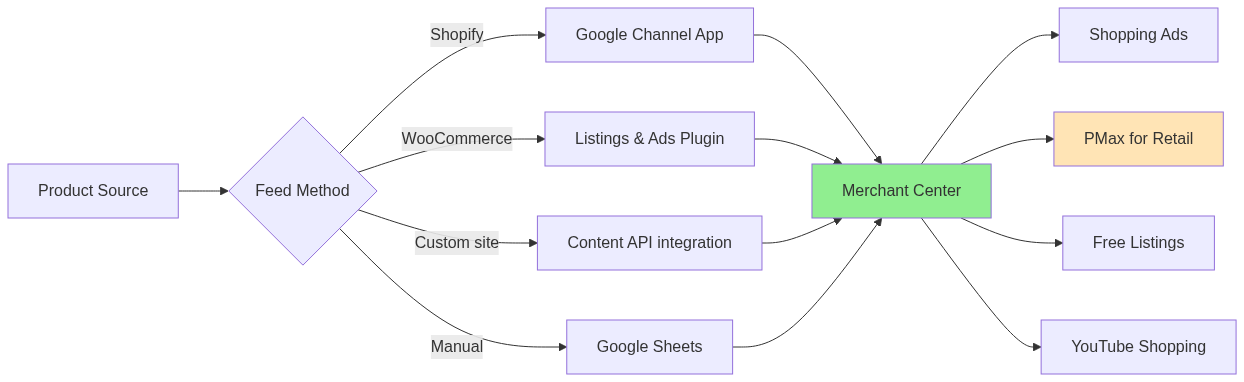
Google Merchant Center — Foundation ก่อนทุกอย่าง
Google Ads B2C ไม่มี Merchant Center = ไม่มี Shopping Ads = ทิ้ง 60-70% traffic potential ของ e-com
Merchant Center คืออะไร
Database สินค้าของคุณที่ Google อ่านได้ — ใช้สำหรับ:
– Shopping Ads (Search results)
– PMax for Retail (cross-channel — Search, YouTube, Display, Gmail, Maps)
– Local Inventory Ads (online + offline inventory)
– Free listings (Shopping tab, free!)
– YouTube Shopping (link product feed กับ YouTube channel)
Setup steps (TH-specific)
- Create account ที่ merchants.google.com → เลือก Thailand
- Verify domain (HTML tag / DNS / Google Analytics)
- Link Google Ads account
- Upload product feed (3 วิธี — ดู section ถัดไป)
- Configure shipping settings — สำคัญสำหรับ TH (free shipping common expectation)
- Configure tax — VAT 7% included in price (TH standard)
- Verify business info — phone + address
Feed upload methods
1. Google Sheets feed (manual/semi-auto)
– ใช้สำหรับ <500 SKUs
– เปลี่ยน Sheet → Merchant Center อ่านทุก 1-24 ชม
– ง่าย แต่ scale ลำบาก
2. Scheduled fetch (XML/CSV from URL)
– Merchant Center fetch จาก URL ที่ host ของคุณทุกวัน
– ใช้สำหรับ feed ที่คุณ generate เอง
3. Content API for Shopping (auto/real-time)
– App-to-app sync แบบ real-time
– Shopify / WooCommerce / Magento มี plugin official
– Best for production — แนะนำ
4. Shopify Channel / WooCommerce Plugin (1-click)
– ถ้าใช้ Shopify → “Google Channel” app official
– ถ้าใช้ WooCommerce → “Google Listings & Ads” plugin
– Auto-sync + ใช้ง่ายที่สุด
TH-specific: Shopee / Lazada ไม่มี native feed → ต้อง export CSV manually หรือใช้ third-party tool (DataFeedWatch, GoDataFeed). หลายแบรนด์เลือกทำ standalone website ขนาดเล็กแยกต่างหากเพื่อใช้ Google Shopping Ads — ROI คุ้มถ้า volume เกิน 50 orders/วัน
Feed Optimization — ที่ levers ROAS มากที่สุด
Feed quality = direct correlation กับ Shopping Ads performance. มี 4 fields ที่ critical:
1. Product Title (สำคัญสุด)
Algorithm matching keyword ที่ user search → ส่วนใหญ่ match ที่ title
Bad title:
ครีมบำรุงผิว
Good title:
Cetaphil Moisturizing Cream ครีมบำรุงผิวหน้า สำหรับผิวแห้ง ไวต่อสารก่อภูมิแพ้ 250g
Formula:
[Brand] [Product Name] [Generic Type] [Key Attribute] [Size/Variant]
TH-specific tips:
– ผสมไทย+อังกฤษ (consumers search ทั้ง 2 ภาษา)
– ใส่ขนาด/น้ำหนัก/ปริมาณ
– ใส่สี/รส/รุ่น
– ห้ามใช้ ALL CAPS หรือ promotional text (“SALE!!!” → reject)
2. Product Description
- 500-1000 ตัวอักษร
- Highlight key benefits + use cases
- ไม่ใส่ HTML
- ใส่ specifications
3. Image (≥800x800px)
- White background preferred (Shopping convention)
- ไม่มี text overlay
- ไม่มี watermark
- ไม่มี promotional badges
4. GTIN / Brand
- GTIN (UPC, EAN, ISBN) — ถ้ามี คะแนน higher Shopping rank
- Brand — must match brand authority
Custom labels (5 ช่อง)
ใช้ทำ campaign segmentation:
– custom_label_0 — Margin tier (low / mid / high)
– custom_label_1 — Bestseller flag (yes/no)
– custom_label_2 — Seasonality (summer / winter / all-year)
– custom_label_3 — Stock level (high / low / clearance)
– custom_label_4 — Brand tier (luxury / mainstream / value)
ใช้ใน Shopping campaign เพื่อ bid ต่าง tier ต่างกัน (e.g. bid สูงสำหรับ high-margin + bestseller)
Shopping Ads (Standard) — ปกติยังจำเป็นอยู่
แม้ PMax จะเด่นกว่าใน 2026 — Standard Shopping Ads ยังมีประโยชน์สำหรับ:
– Niche product (ไม่มี signal เพียงพอสำหรับ PMax)
– Brand-specific search (force-show your product on brand searches)
– Test new product launches
– Granular control ที่ PMax ไม่ให้
Campaign structure ที่ใช้ได้จริง
Option A: Single campaign + product groups
– 1 campaign
– Subdivide ผ่าน Product Groups (by category / brand / custom_label)
– Bid ต่างกันใน group level
– ใช้สำหรับ catalog < 500 SKU
Option B: Multiple campaigns by tier
– High-priority campaign — top sellers, high margin
– Mid-priority — main catalog
– Low-priority / catch-all — long tail
– ใช้สำหรับ catalog ≥ 500 SKU
Bidding strategy
- Maximize Clicks — แค่ test phase
- Manual CPC — granular control, ตอนยังไม่มี data
- Target ROAS — production default. ตั้ง 300% (3x) แล้ว tune
- Maximize Conversion Value — let Google bid
Performance Max (PMax) for Retail — ปี 2026 default
PMax = Google รวม Search + YouTube + Display + Gmail + Maps + Discover เป็น 1 campaign + ใช้ Merchant Center feed → smart bidding everywhere
When PMax wins
- Catalog ≥ 50 active SKUs
- Conversion volume ≥ 30/week (algorithm needs signal)
- Diverse audience (broad B2C product)
- Want cross-channel without complexity
When Standard Shopping wins
- Catalog niche / small
- Brand bidding (PMax ไม่ control brand search well)
- ต้อง granular control
- Conversion signal น้อย (อย่า dilute ใน PMax)
PMax Asset Group structure

Best practices
- Audience Signal — ใส่ Customer Match + Lookalike เพื่อ help algorithm start
- Negative keywords — exclude brand searches (ถ้ามี Standard brand campaign แยก)
- Final URL Expansion — turn OFF เริ่มต้น (ป้องกัน Google ส่ง traffic ผิดหน้า)
- Brand exclusions — add competitor brand if needed
Migration from Smart Shopping → PMax
ถ้ายัง run Smart Shopping อยู่ — migrate ภายในไตรมาส 1-2 ของปี (Google จะ sunset เร็วๆ นี้):
1. Backup current Smart Shopping data (export 90 days)
2. Create PMax campaign with same budget + tROAS
3. Add same products + asset groups
4. Pause Smart Shopping after PMax learning (2-4 weeks)
Search Ads — ยังจำเป็นสำหรับ Brand + High-intent
แม้ Shopping/PMax จะเด่นใน B2C — Search Ads ยังจำเป็นสำหรับ:
Brand campaign (must-have)
- Bid บนชื่อแบรนด์คุณเอง (เช่น “cetaphil ไทย”, “uniqlo สั่งออนไลน์”)
- Why: ป้องกัน competitor bid บนแบรนด์คุณ, capture high-intent traffic
- Quality Score 10/10 ปกติ → CPC ต่ำมาก
- ROAS 8-15× typical
Generic high-intent search
- “ครีมบำรุงผิว สำหรับผิวแห้ง”
- “รองเท้าวิ่ง ผู้ชาย”
- “smartphone ราคา 10000”
- ROAS ต่ำกว่า brand แต่ scale ได้
Competitor bidding (use carefully)
- Bid บนชื่อแบรนด์คู่แข่ง
- ต้องระวัง: trademark issue, low Quality Score, ad disapproval
- กลยุทธ์: ใช้กับ competitor ที่อ่อนเท่านั้น
Local Inventory Ads (LIA) — สำหรับ Omnichannel
ถ้ามีหน้าร้าน + online shop — LIA = แสดง stock available ที่ร้านใกล้ user
Requirements
- Google Business Profile (Maps) verified
- Product feed มี local availability data (stock per store)
- Free service จาก Google
Best for
- Fashion / Electronics chains (Power Buy, Banana IT, Central, etc.)
- Bookstores
- Pharmacies
- Grocery (CP Fresh Mart, Tops)
Setup
- Verify business locations in Google Business Profile
- Add
local_inventoryfeed (stock by location SKU) - Enable LIA in PMax for Retail campaign
- Audience: “near me” searches + local intent queries
YouTube Shopping — ใหม่และเด่นปี 2026
YouTube + Merchant Center = ผูก product feed กับ YouTube channel ของคุณ → ads ปกติของคุณกลายเป็น shoppable
Setup
- YouTube channel ≥ 1000 subs (เกณฑ์ปัจจุบัน)
- Link Merchant Center กับ YouTube
- Enable Shopping in YouTube Studio
- Products show in: Shorts, Live streams, Video shelf
Best for
- Brands ที่มี content marketing แล้ว
- Live shopping audience (TH growing fast)
- Cross-promote กับ influencers
Enhanced Conversions + GA4 — Measurement Stack
Enhanced Conversions
ส่ง hashed first-party data (email, phone) จาก site → Google match กับ user logged-in → recover ~20-30% conversion attribution loss
Setup:
1. Enable Enhanced Conversions ใน Google Ads → Conversions
2. Implement via Google Tag (gtag) หรือ GTM
3. Hash email/phone client-side (SHA-256)
4. Send with conversion event
GA4 E-commerce Tracking
view_item— product page viewadd_to_cartbegin_checkoutpurchase— primary conversionrefund(if applicable)
Import GA4 conversions to Google Ads → Smart Bidding ใช้ signal นี้
Data Driven Attribution (DDA) — default ปี 2026
Google เปลี่ยน default attribution model เป็น DDA (was last-click). ใช้ machine learning ดู conversion path → credit แต่ละ touchpoint ต่างกัน
ROAS Benchmark Google Ads TH B2C (2026)
| Category | Brand Search ROAS | Generic Search | Shopping/PMax | Blended |
|---|---|---|---|---|
| Fashion | 10-20× | 2-4× | 3-6× | 4-7× |
| Beauty | 12-25× | 3-5× | 4-8× | 5-9× |
| Electronics | 15-30× | 4-7× | 6-12× | 7-13× |
| Food/Beverage | 8-15× | 2-3× | 2.5-5× | 3-5× |
| Home/Living | 10-18× | 3-5× | 4-7× | 5-8× |
Brand search ROAS สูงเพราะ high-intent + low CPC. Generic + Shopping bear the volume
Common Pitfalls ใน Google Ads B2C TH
- No Merchant Center — ทำ B2C โดยไม่ Shopping Ads = ทิ้งโอกาส
- Feed unoptimized — title สั้น/ไม่ใส่ brand/size → Quality Score ต่ำ
- ใช้ PMax ตอนยังไม่มี signal — conversions < 30/week → algorithm เรียนไม่ได้
- ลืม brand campaign — competitor bid ขโมยลูกค้า
- ไม่ดู search terms report — เห็น irrelevant query ที่ waste spend
- Target ROAS ตั้งไว้สูงเกินไปจาก start — algorithm starve, ไม่ scale
- ไม่แยก mobile vs desktop bid — TH 80%+ mobile, ต้อง optimize accordingly
- เปลี่ยน budget ทุกวัน — algorithm ต้อง 7-14 วัน learn — อย่า panic-edit
Quick Start Checklist (Google Ads B2C ใหม่)
Week 1 — Foundation
- [ ] Setup Google Merchant Center + verify domain
- [ ] Upload product feed (Shopify Channel / WooCommerce plugin / Content API)
- [ ] Verify ≥95% products active in Merchant Center diagnostics
- [ ] Setup Google Ads conversion tracking (Purchase + AddToCart)
- [ ] Enable Enhanced Conversions
- [ ] Setup GA4 e-commerce events + link to Google Ads
Week 2 — First Campaigns
- [ ] Launch Brand Search campaign (small budget, captures high-intent)
- [ ] Launch PMax for Retail (or Standard Shopping if catalog < 50)
- [ ] Budget: 500-2000 บาท/วัน ต่อ campaign
- [ ] Bid strategy: Target ROAS 300% start
- [ ] Add Customer Match + Lookalike as Audience Signal
Week 3-4 — Optimize
- [ ] Review search terms report — add negative keywords
- [ ] Optimize feed: improve titles for low-performing SKUs
- [ ] Adjust tROAS based on actual performance
- [ ] Test creative variations in PMax asset groups
- [ ] Setup remarketing list (cart abandoners, viewers)
Month 2+
- [ ] Add Local Inventory Ads (if have physical stores)
- [ ] Setup YouTube Shopping (if YouTube channel active)
- [ ] Migrate any remaining Smart Shopping to PMax
- [ ] Setup automated rules (pause low-ROAS SKUs)
- [ ] Quarterly incrementality test
บทความที่เกี่ยวข้อง
- Google Ads สำหรับ B2B ในไทย ปี 2026 — สำหรับ B2B service / SaaS
- Meta Ads สำหรับ B2C ในไทย ปี 2026 — companion guide
- MarTech Analytics & Tracking Guide — GA4 + Enhanced Conversions setup
- AI in Marketing Guide — Google AI assets generation
Key Takeaways (สรุป): Google Ads B2C ปี 2026 = Merchant Center foundation + Shopping/PMax + Brand Search + Enhanced Conversions. Feed optimization (title, image, GTIN) คือ #1 lever. PMax for Retail เป็น default แต่ยังต้องมี Brand Search + Standard Shopping ตามความเหมาะสม. ROAS benchmark TH 5-9× blended สำหรับ healthy account
บทความที่เกี่ยวข้อง